husk: a macOS uninstaller that hunts down every leftover
A native macOS app uninstaller: confidence-scored leftover detection across containers, caches, preferences, and launch agents, sharing one engine between a SwiftUI GUI and a CLI
Dragging an app to the Trash removes the bundle and leaves everything else behind: caches, preferences, containers, launch agents, Spotlight registrations. Most uninstallers “fix” this by fuzzy-matching folder names and deleting anything that looks related, which is exactly how they end up deleting the wrong thing. husk is built around a stricter idea: nothing gets removed without a stated reason, and nothing gets deleted outright. It goes to quarantine first, restorable, until you say otherwise.
It ships as a SwiftUI app and a husk CLI. Both are a thin shell over the same UninstallKit library, so the GUI isn’t a second implementation trailing behind the CLI: same scan, same confidence tiers, same safety rules, either surface.
Key features
- Confidence-scored matching:
exact(bundle ID or executable found in the file),likely(team ID or exact folder-name match),possible(fuzzy resemblance, opt-in only, never pre-selected) - Scans containers, caches, preferences (including ByHost), Group Containers, Application Scripts, Saved Application State, launch agents/daemons, and installer receipts via
pkgutil - Reference-counts shared components (Microsoft AutoUpdate, shared containers) so removing one app never breaks another
- A dedicated Ghosts view for registrations that outlive the apps that made them: stale Launch Services entries, orphaned Full Disk Access grants, dead Spotlight importers
- Nothing is deleted directly: items move to quarantine via
FileManager.trashItem(or a user-owned quarantine folder for root-owned files), restorable until purged - Reduced-scan mode when Full Disk Access isn’t granted: husk still runs and says plainly what it couldn’t see, instead of quietly reporting a clean system
- Same capability set in the CLI as the GUI, including
--dry-run,--json, and--include-shared
Tech stack
# core
swift 5.9 | swiftui | swift package manager
# cli
swift-argument-parser# system integration
pkgutil | lsregister | pluginkit | fileproviderctl | tccutil | cfprefsdHow it works
Engine first, surfaces second. Package.swift builds three targets off one library: UninstallKit does the scanning, matching, and removal logic; HuskCLI and HuskApp are both thin dependents of it. Any behavior fixed in the engine is fixed everywhere at once.
Matching is a confidence ladder, not a boolean. A bundle identifier found inside a file, or an installer receipt listing it directly, is exact. A team identifier or a folder name matching the app name exactly is likely and is pre-checked by default. Anything weaker (fuzzy name resemblance) is possible: it requires an explicit opt-in and is never pre-selected. Names under five characters and a denylist of generic words (mail, notes, code, sync) are excluded from fuzzy matching entirely, since that’s where most uninstallers cause real damage.
Removal order is load-bearing. TCC privacy grants are reset and the app is unregistered from Launch Services before the bundle is deleted, because once the bundle is gone, tccutil and lsregister can no longer resolve its identifier to reset it. cfprefsd is killed after any preference removal, otherwise the daemon writes its cached copy straight back to disk. These two orderings are covered by their own acceptance tests, since getting them backwards silently ships a tool that looks like it works.
Ghosts are handled honestly, not optimistically. A stale pluginkit registration or Launch Services entry gets cleared directly. An orphaned Spotlight entry is different: clearing it fully requires a reindex that can take hours, so husk states that plainly and offers it as a separate, explicit opt-in rather than folding it into Fix all. A TCC grant whose bundle ID no longer resolves can only be cleared by resetting the entire privacy category, which would revoke access for every other app using it. husk shows the entry, names exactly what else would lose access, and refuses to bundle that into a one-click fix.
Quarantine is always user-owned. Everything moved to quarantine, including root-owned items relocated to ~/.husk-quarantine/ via an authorized helper, ends up chown’d to the invoking user, so the quarantine directory can be deleted without sudo. A manifest.json per run records the original path, size, and ownership of every item, which is what makes husk restore possible.
CLI usage
$ husk scan AppCleaner
  100%  done
AppCleaner 3.6.8
  net.freemacsoft.AppCleaner  team X85ZX835W9
  /Applications/AppCleaner.app

  exact     8.4 MB     /Applications/AppCleaner.app [admin]
             Application: The application bundle
  exact     66 KB      ~/Library/HTTPStorages/net.freemacsoft.AppCleaner
             Web Data: Named for the bundle identifier net.freemacsoft.AppCleaner
  exact     4 KB       ~/Library/Preferences/net.freemacsoft.AppCleaner.plist
             Preferences: Named for the bundle identifier net.freemacsoft.AppCleaner

  3 item(s), 8.5 MB
$ husk ghosts
Stale registrations
Launch Services
com.google.GoogleUpdater
missing: ~/Library/Application Support/Google/GoogleUpdater/148.0.7730.0/GoogleUpdater.app
Registered bundle no longer exists on disk
com.microsoft.OneDrive
missing: ~/.husk-quarantine/2026-08-24T07-17-34Z/Applications/OneDrive.app
Registered bundle no longer exists on disk
2 stale registration(s)
Repair
/System/Library/.../LaunchServices.framework/Support/lsregister -delete
/usr/bin/killall lsd Dock Finder
Rebuilds the Launch Services database and restarts Finder and the Dock,
which sometimes clears extension list entries too, but not reliably.
Ghost login items live in a separate database — `sudo sfltool resetbtm`
clears it, but wipes every background item for every app, so treat that
as a last resort.
Run `husk ghosts --repair` to do this for you.That second block is the real output, unedited, including the caveat about sfltool resetbtm being a last resort. husk telling you a fix is incomplete, rather than reporting a clean sweep, is the same design principle as the GUI’s reduced-scan banner: say what’s actually true, even when the honest answer is “not fully.”
Highlights
App list, scan results with confidence tiers, and the Ghosts view for stale registrations.
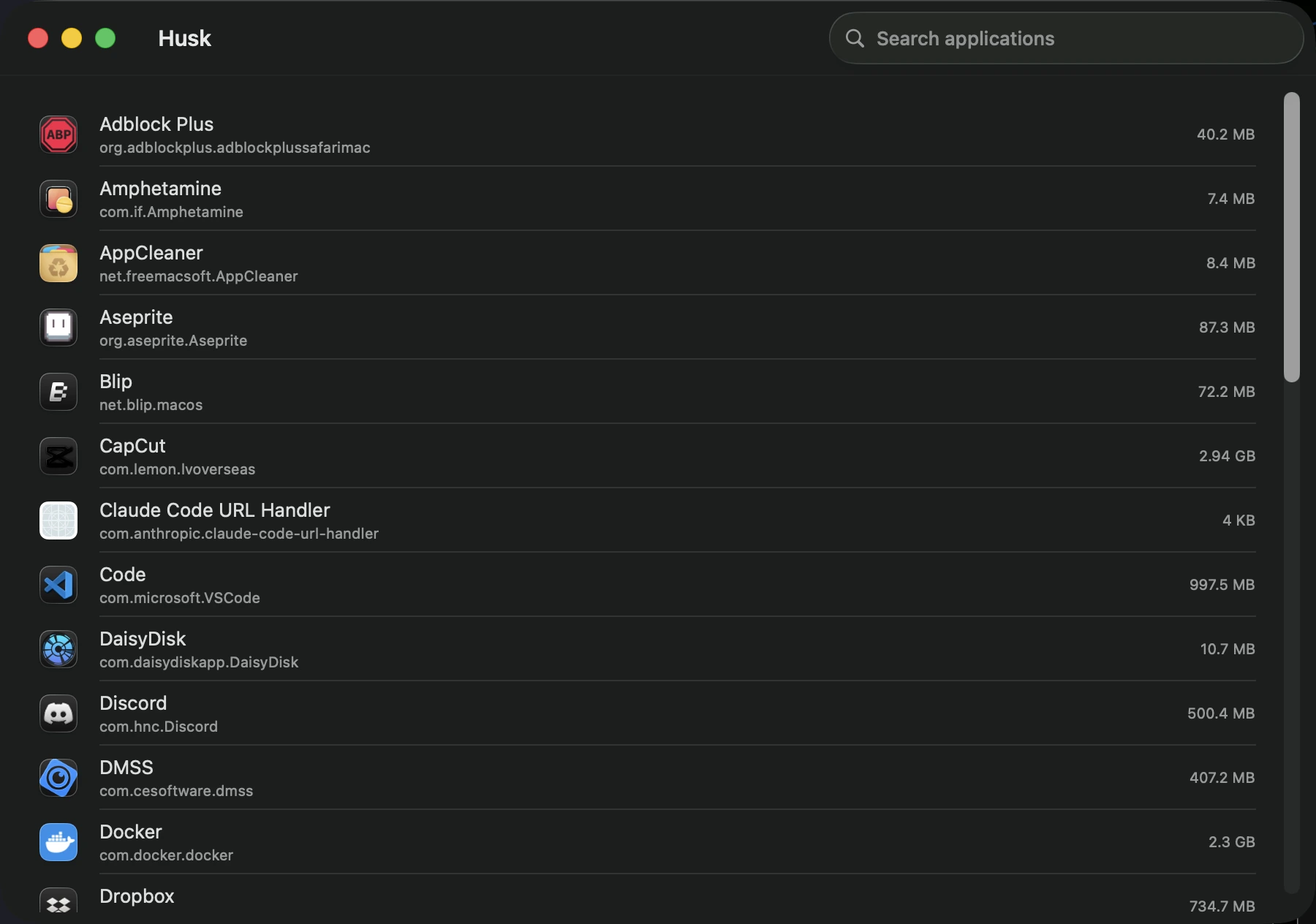
main window: every installed app, sortable and searchable
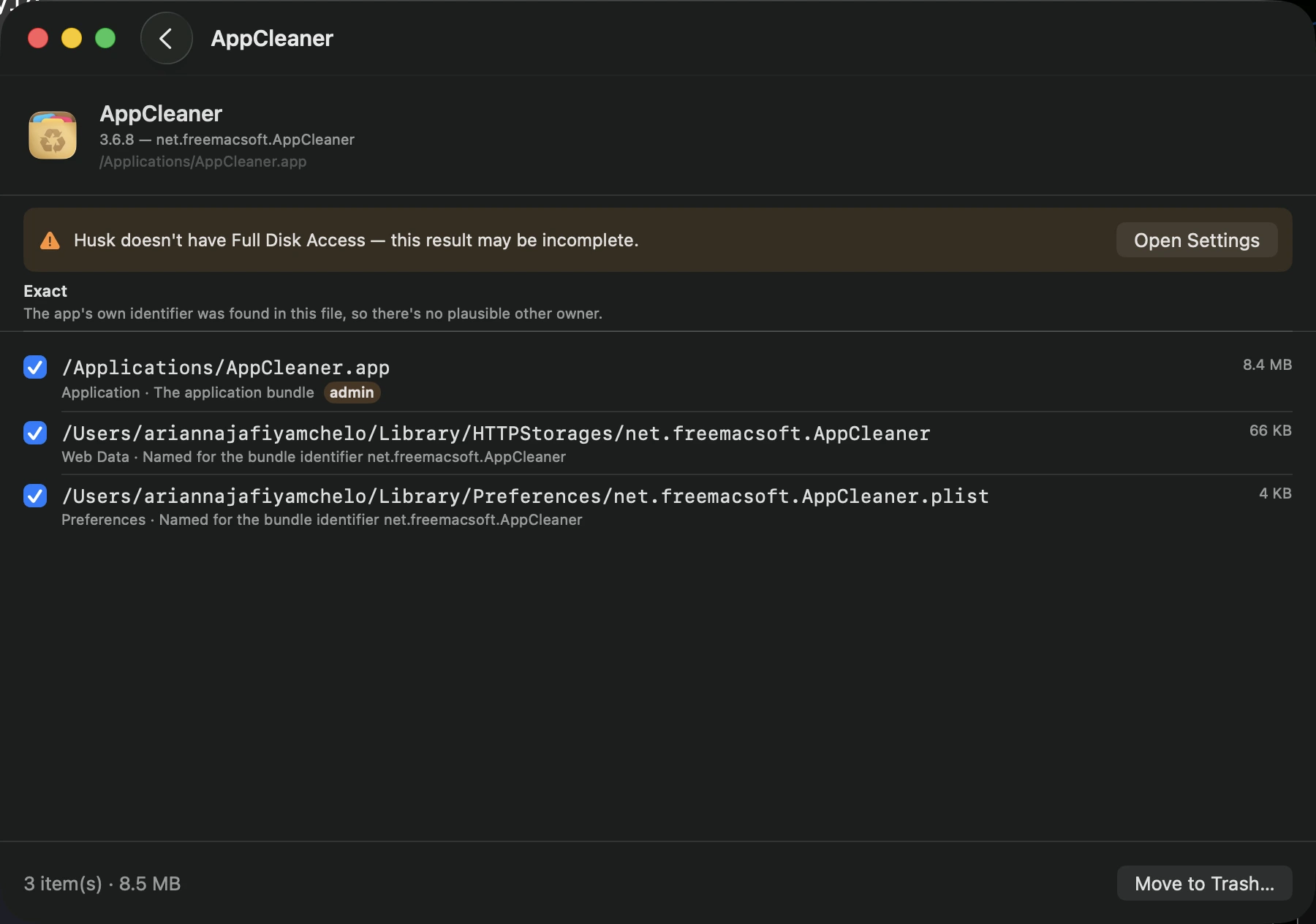
scan results: exact matches, plus the reduced-scan banner when FDA isn’t granted
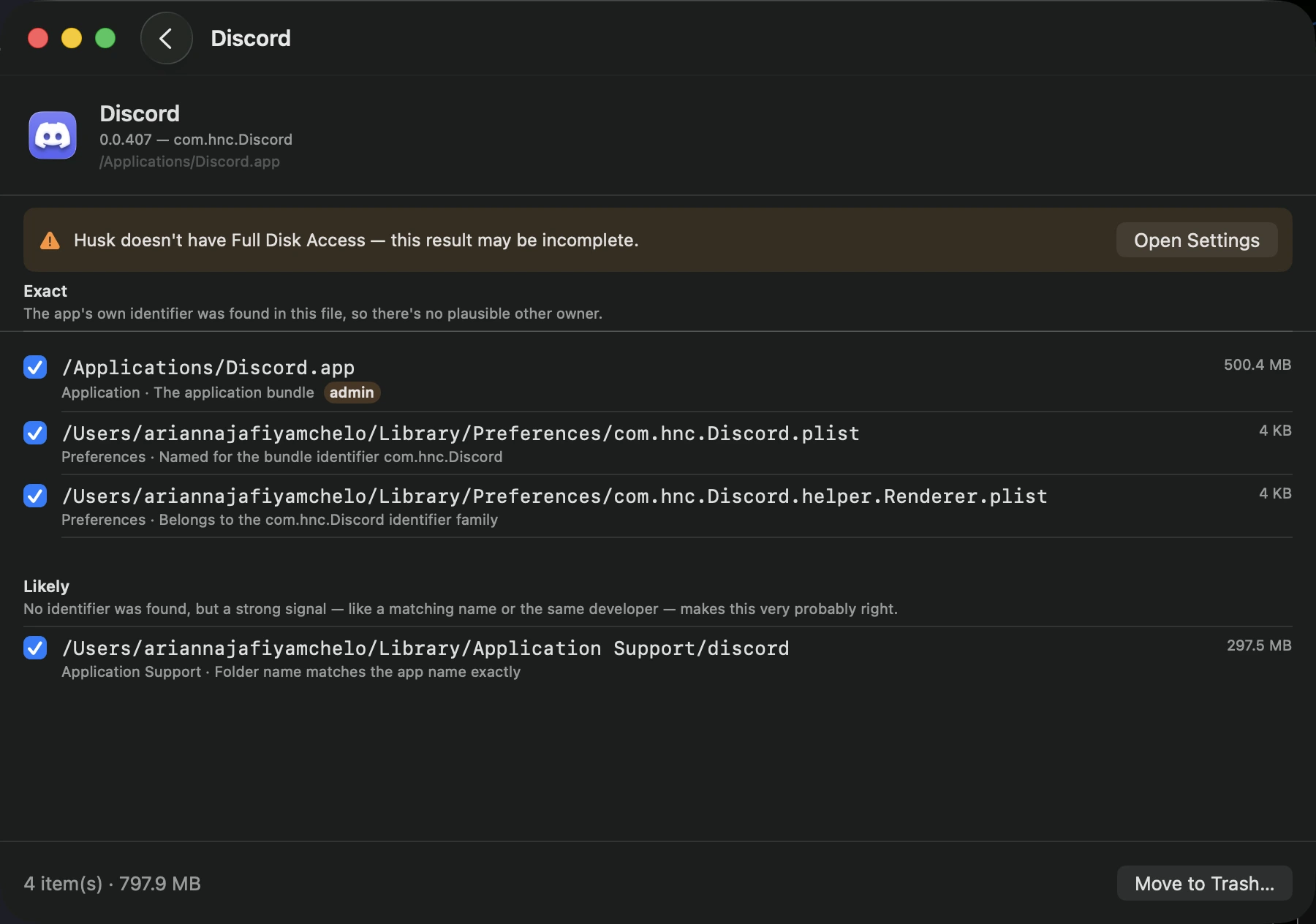
confidence tiers: exact and likely matches, each with its reasoning shown inline
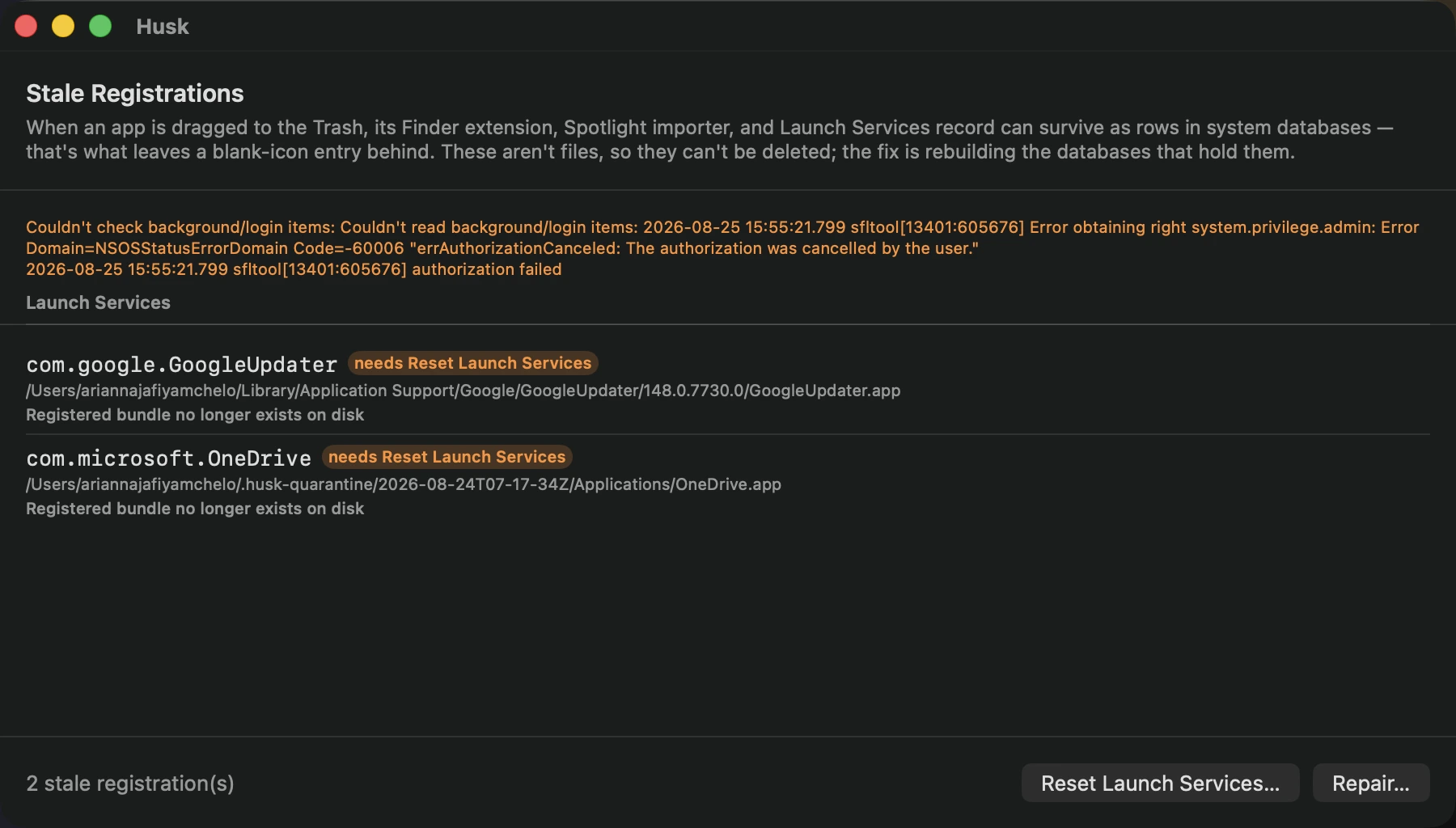
ghosts view: registrations that outlived the apps that made them
The ordering constraint around TCC and Launch Services was the part I underestimated going in. It reads like an implementation detail — reset privacy grants before you delete the bundle — but it’s actually the whole reason a lot of uninstallers leave orphaned Full Disk Access entries behind: once the bundle is gone, the identifier that tccutil needs to resolve is gone with it, and there’s no clean way back in. Writing the acceptance criteria before the removal sequence forced that ordering to be explicit instead of something I’d have gotten right by accident once and broken later during a refactor.
The confidence tiers turned out to matter more than I expected, too. It’s tempting to build an uninstaller around “does the name look similar,” but that’s precisely the heuristic that deletes ~/Library/Caches/Notes because someone had an app called notes-sync. Splitting matches into exact, likely, and possible (with possible requiring an explicit opt-in and a denylist for generic short names) pushed most of the design work into deciding what not to trust automatically, which ended up being more interesting than the removal code itself.