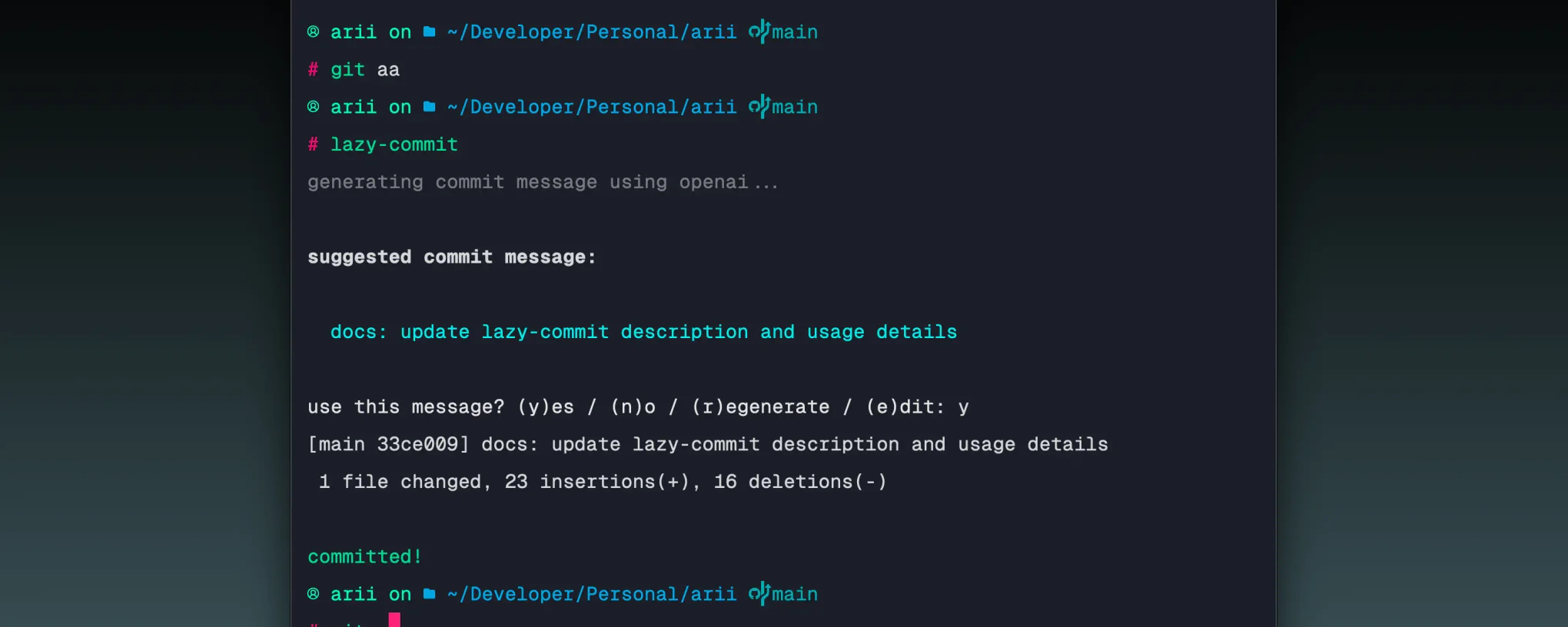
lazy-commit: ai-powered git commit message cli
A tiny Node.js CLI for generating AI-powered conventional commit messages with dry-run mode, editing, and confirmation prompts
I built lazy-commit because writing commit messages is one of those small tasks that adds friction every single day. It takes whatever you have staged, generates a conventional commit message from the real diff, and asks you before it commits. Fast enough to use constantly, safe enough that you don’t accidentally commit something you didn’t mean to.
key features
- Reads staged diff via
git diff --staged - Sends diff to an LLM with a strict conventional commits prompt
- Confirmation prompt before committing —
y,n,r, ore - Regenerate a new message without leaving the prompt
- Inline editing with the current message pre-filled
- Dry-run mode to preview without committing
--versionflag to check the installed version- Interactive config wizard for provider, API key, custom rules, and prefix
- Multi-provider support: OpenAI, Anthropic, Groq, Gemini
- Exits early with a clear message if there are no staged changes
tech stack
# core
typescript | node.js | readline | chalk
# providers
openai (gpt-4o-mini) | anthropic (claude-haiku) | groq (llama3-8b) | gemini (gemini-1.5-flash)how it works
The flow is split into small files that each do one job. git.ts retrieves the staged diff and exits cleanly if the command fails. prompt.ts prints the suggested message and waits for input — y to commit, n to cancel, r to regenerate, or e to edit inline with the current message pre-filled. config.ts stores settings at ~/.config/lazy-commit/config.json and runs a readline wizard when you call lazy-commit config. providers/index.ts builds the system prompt including any custom instructions or prefix rules, then routes to the chosen provider adapter.
The CLI entry point in index.ts wires it all together: fetch diff, load config, generate message, confirm, commit. The confirmation loop runs until you either commit or cancel, so you can regenerate or edit as many times as you need without rerunning the command.
usage
# install globally
npm install -g @ariian/lazy-commit

# set up provider and api key
lazy-commit config

# stage your changes then run
git add .
lazy-commit

# preview only
lazy-commit --dry-run

# check installed version
lazy-commit --version
highlights
The confirmation step is what makes this usable without anxiety. Automating a git commit sounds dangerous until there is always a prompt between the suggestion and the actual commit. That one step is the difference between a tool you trust and one you avoid.
Adding regenerate and edit made the tool feel complete. If the first suggestion is off you can hit r to get a new one instantly, or e to tweak the wording yourself with the generated message already in the input with no retyping from scratch. The loop keeps running until you are happy with the result or decide to cancel.
You can also customise the output via lazy-commit config. Set your own commit rules under instructions (e.g. “always use present tense” or “keep messages under 50 characters”) and an optional prefix that gets prepended to every message. The tool stays out of your way but adapts to however you like to write commits.
Keeping the diff retrieval, provider logic, and config in separate files also made the CLI layer surprisingly clean. Each piece has one job and the orchestration in index.ts reads almost like a plain English description of what the tool does.